The top 3 use cases for custom scripts in Customer Data Platforms
This weeks header image is generated by DALL.E with the prompt: “An abstract coloured line drawing of data being passed from one place to another”.
Customer Data Platforms – or CDPs – are all the rage in today’s marketing world, especially considering the increasing importance of first party data.
The core functionality (at least from a marketing perspective): CDPs consolidate data from company infrastructure (mobile apps, web apps, servers) and 3rd party tools, and provide integrations that allow you to forward that data. This is especially useful for sending conversion events and syncing audiences between platforms.
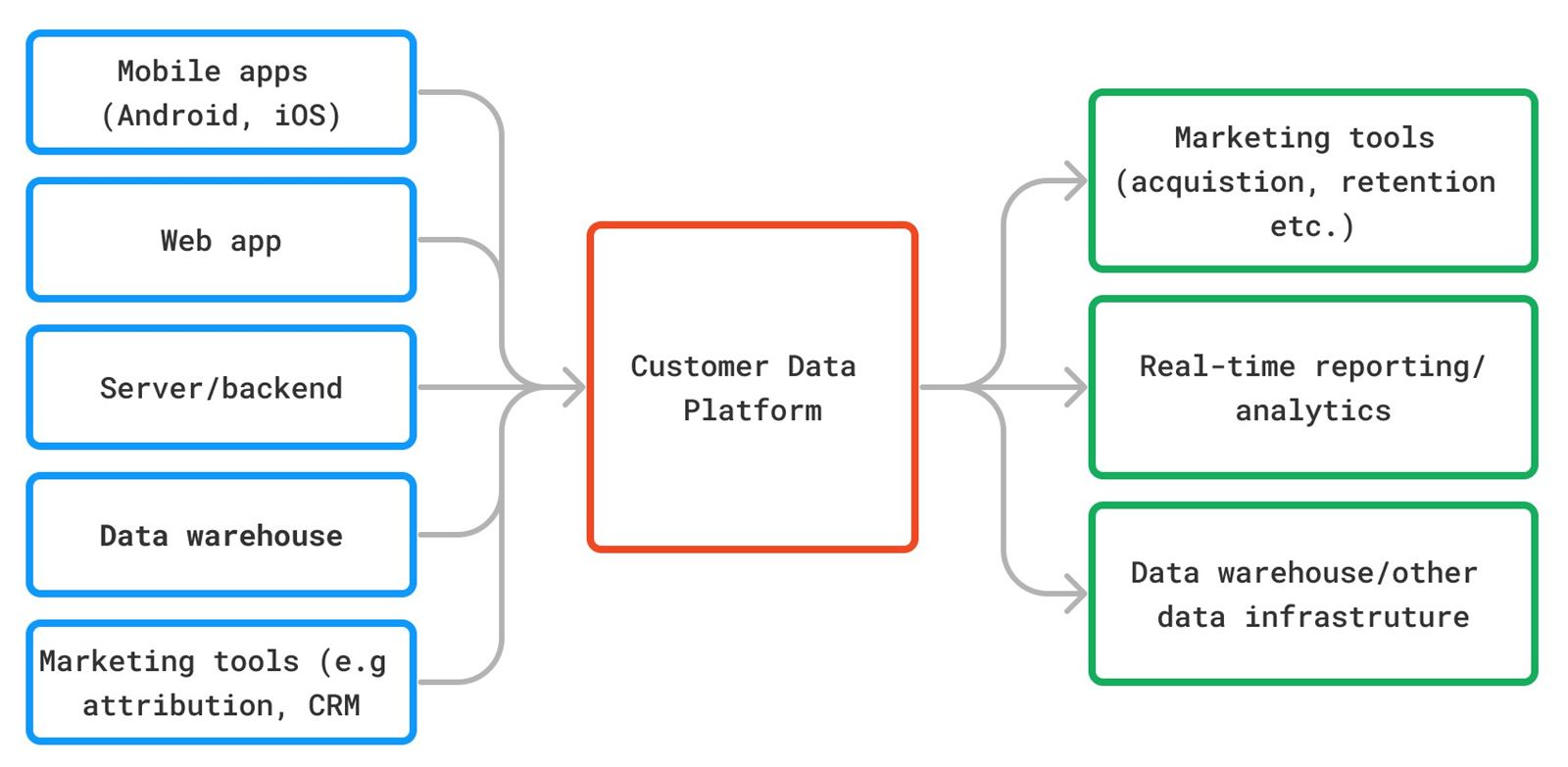
In case you’d like to read more about how Customer Data Platforms work or other basics, I suggest you check this guide or read through the documentation of the 2 CDPs I will refer to in this post: mParticle and Segment.
_Custom scripting functionality__
Whilst most Digital Marketers have used Customer Data Platforms in some way or the other, the breadth of their capabilities are not always easy to grasp.
One of the often-overlooked capabilities is custom scripts.
Using a little bit of Javascript, both of the CDPs that I have first hand experience with (that’ mParticle and Segment), allow you to write scripts which can modify your incoming/outgoing data in real-time, create your own integrations and more.
It’s important to bear in mind that there are some differences in how things work between these 2 platforms.
For starters, custom scripting is called Rules in mParticle and Functions in Segment.
There are also significant disparities in how Rules/Functions are enacted. On mParticle, a script interacts with an event batch before the data is ingested into the CDP or just before it is sent to an output. However on Segment, the script is positioned at the end of the collection-processing-delivery process, meaning the outputted data is sent directly from the script to an API endpoint (3rd party, or Segment).
For more information on the logic behind the custom scripts, consult the mParticle Rules or Segment Functions documentation.
For my part, I’ve found the custom scripting functionality of both mParticle and Segment to be super useful over the last few years. Here are my top 3 use cases (with the CDP that they are suitable for).
_Top 3 custom script use cases__
1. Create a new event, based on the properties of the event triggering the script (mParticle Rules)
Your Engineering team create an event schema during the initial setup of a CDP, with each event usually including event properties (additional pieces of data passed with the event). However, this event schema might not cover all marketing use cases, especially as time passes, new tools are integrated and campaigns/partnerships kicked off.
{
    "event":"purchase",
    "timestamp":"2023-10-12T08:30:00Z",
    "properties": {
        "productId":423531,
        "category":"birthday gifts",
        "price":"23.99",
        "currency":"EUR",
	   "total_number_of_purchases" : 1
    }
}
Example purchase event with properties
One of the coolest use cases of mParticle Rules is to output a new event using conditional filters on the properties of existing events.
Let’s flesh that out a bit with an example.
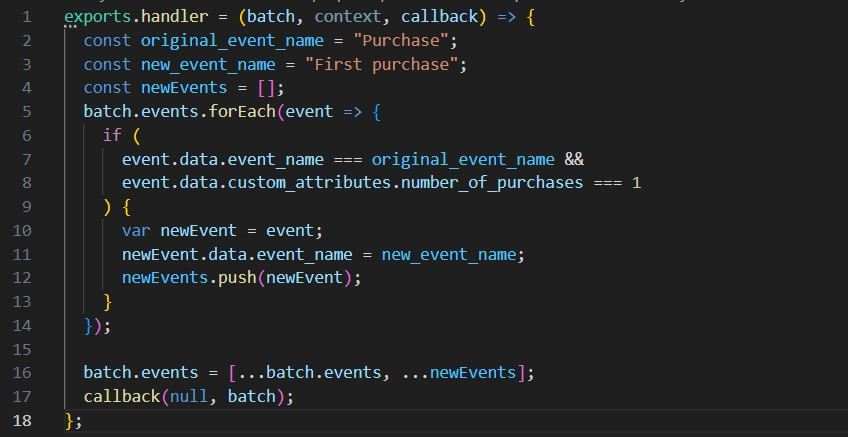
Say you have a generic ‘purchase’ event, but you also need a ‘first purchase’ event to help optimise an acquisition campaign. Assuming your developers have included the appropriate event property – in this case, ‘total number of purchases’ – you can use mParticle Rules to create your ‘first purchase’ event too.
First, read the properties of your incoming ‘purchase’ event. If the total number of purchases equals 1, you duplicate the purchase event & properties, and rename it ‘first purchase’. Finally, you can opt to either return only the new event (effectively dropping the original one) to the outgoing event batch, or return both events (creating a new event in addition to the old one).
2. Enrich event with user profile properties (Segment Destination Function)
One big difference from mParticle Rules is that Segment Functions can only utilise data contained in the original event batch, not data previously attriubted to a user from other events or stored in the user profile.
To continue with the example from 1) above, let’s say you want to make your ‘first purchase’ event, but your original ‘purchase’ event doesn’t have a ‘total number of purchases’ property. Rather, this data is stored as a Trait (user attribute) on the user profile.
Using a Segment Destination Function, you can call the Segment Profile API (traits endpoint) from your script using your user identifier. The Profile API (as the name suggests) returns data collected on a specific user including traits, identifiers and events.
In your function, you can the use the returned traits to filter users who are completing their first purchase. Finally, you write the destination for your updated event in the script. You can send it either directly to your target 3rd party API endpoint, or to a Segment Source endpoint – which can be then connected to one of the pre-defined Destination integrations.
3. Transform and reformat data before ingestion (Segment)
CDPs need incoming data in a specific format. However, you cannot always control the output of 3rd party APIs and ensure it matches the requirements of your CDP. This is one example of when Segment Source Functions are super useful!
As long as your 3rd party tool can send data as a POST call, you can use a Source Function; extract the relevant properties (user id, device details etc.) and transform the data to trigger a Track event, or an Identify event to record user traits.
Aside from increasing the connectivity of your martech stack, Source Functions also reduce the need for intermediate transformation services or other infrastructure that might need to be maintained by your Engineering team. Good news all around!
_Summing up__
Customer Data Platforms enable Marketing to take on a greater role in defining the event schema, which is important for triggering campaigns, reporting/attribution and campaign optimisation.
Custom scripts aka. Rules aka. Functions give further possibilities to technically minded marketers allowing them – amongst other use cases – to create new events, enrich existing ones and transform data before it hits the CDP.