Setting up a football prediction campaign with Braze in-app messages
Football summer is almost upon us! It’s just a couple of months until the European Championship, hosted right here in Germany and I’ve got all my fingers crossed that England can *finally* pull off a tournament win in my lifetime.
Aside from all the sporting fun times, football tournaments are also a marketer’s paradise – providing a perfect excuse to get creative and whip up some excitement about your product. Many companies will be running some kind of football tie-in campaign, but nailing down exactly what type of campaign to run can be hard.
One great option for top of the league ???? customer engagement is running a match prediction campaign.
Trying to guess the results of tournament matches is nothing new of course, as those of us who have spent hours with our mates discussing this very topic can attest to. The challenge for Digital Marketers is to make a prediction campaign scaleable and (at least partially) automated, preferably without having to build some custom platform with the help of Product and Engineering.
All of this brings me on to Braze. Most people reading this post will be familiar with this widely-used CRM platform. One often overlooked functionality, in relation to in-app messages, are javascript bridges. Amongst other things, these super useful methods allow you to save information from an in-app message directly into a user’s profile (including predictions on football matches).
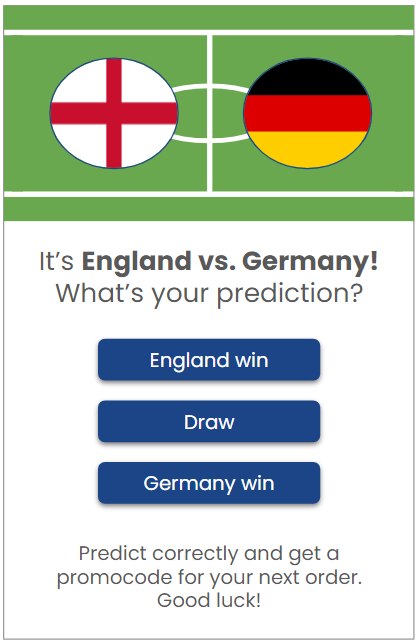
In this post, I will walk you through an outline of a scalable and semi-automated football prediction campaign; making use of in-app messages, Braze’s javascript bridges, and your CRM database.
Let’s get ready for kick off!
_What you will need__
- Braze*
- Database of customers
- Ability to make custom in-app templates (some HTML, CSS & Javascript skills required)
- A reward, for successful predictions
- Some terms & conditions for participation
*For non-Braze users: apologies, I don’t mean to exclude you! Really you just need a tool with javascript bridges or similar functionality that allows you to save attributes to a user profile. Other CRM tools might very well offer this. Check the docs!
Very important legal note before we get started: The organiser of Euro 2024, UEFA, have some strict rules in place to protect their brand, which limit the scope of 3rd party marketing campaigns. You should consult your legal team before setting up any football tournament-based campaign!
_Let’s go through the campaign in detail__
The campaign works like this:
1. To keep your prediction campaign simple, pick one match each day during the tournament. On days with multiple matches, just pick the most exciting one(very subjective, I realise!)
2. Choose your customer segment. You might send to all your customers, but you may also wish to limit this campaign to your most active people.
3. Set up an in-app campaign, triggered on app session open or other early funnel event.
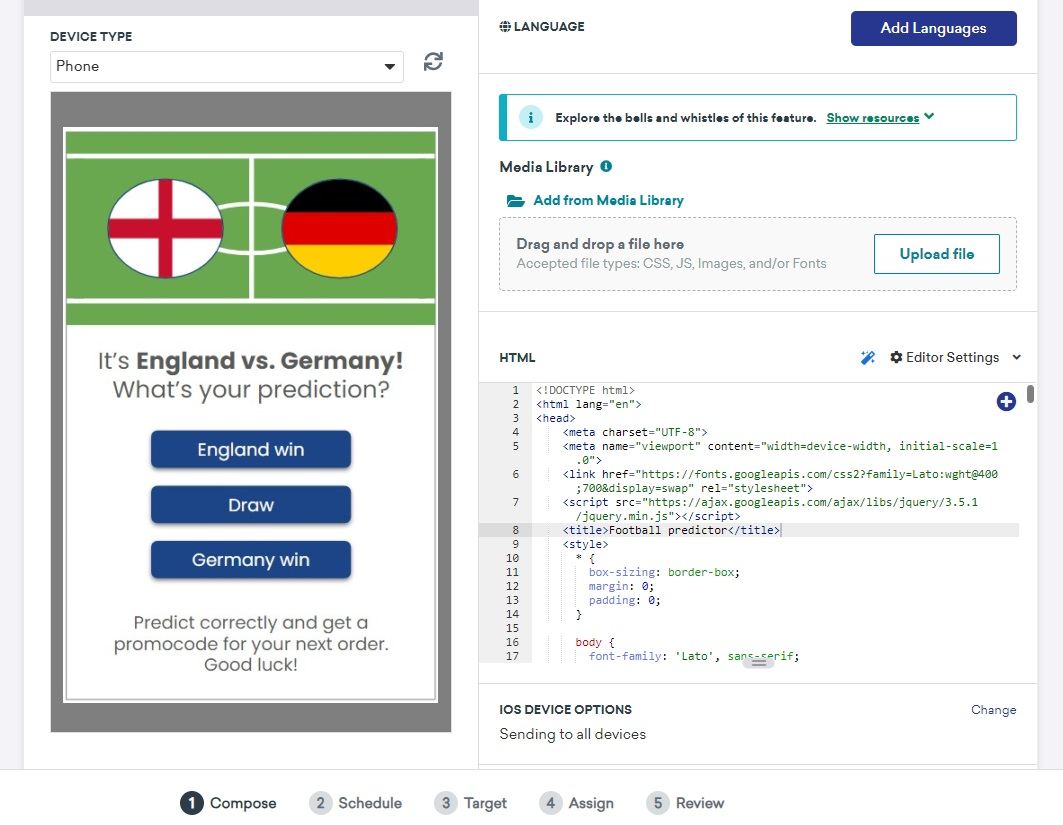
4. You will need to set up a custom HTML template in your campaign. The in-app should have some appropriate designs and 3 buttons to collect the customers’ prediction (team A win, draw, team B win).
5. You’ll probably want to include a link to your T&Cs, as well as a button to close the in-app without response. Let’s not forget, some people really don’t like football!
6. On button tap, the customer’s selection is saved to their profile as a custom attribute via javascript bridge.
How does the Javascript bridge work and why is it important for this campaign?
In your custom HTML template, you would need to add something like this:
<button id="button">England win</button>
<script>
// Wait for the `brazeBridge` ready event, "ab.BridgeReady"
window.addEventListener("ab.BridgeReady", function(){
  // Event handler when the button is clicked
  document.querySelector("#button").onclick = function(){
    // Track Button 1 clicks for analytics
    // Note: This requires Android SDK v8.0.0, Web SDK v2.5.0, Swift SDK v5.4.0, and iOS SDK v3.23.0
    brazeBridge.logClick("0");
    // Set the user's custom attribute
    brazeBridge.getUser().setCustomUserAttribute("match_prediction", "team_a_win");
    // Track a custom event
    brazeBridge.logCustomEvent("match predicted");
    // Send the enqueued data to Braze
    brazeBridge.requestImmediateDataFlush();
    // Close this in-app message
    brazeBridge.closeMessage();
  };
}, false);
</script>
This script will log a button click, a custom event (“match predicted”), as well as the essential ‘match_prediction’ custom attribute. For this campaign to work, you will need to log the appropriate values to the custom attribute: ‘team_a_win’, ‘draw’, ‘team_b_win’.
Finally, the javascript bridge will ‘flush’ the data i.e. send it immediately, without any delay for caching (data saving), and close the in-app message.
7. The match kicks off…
8. After the match is concluded, you need to pay out the reward to successful predictors! How you handle promocodes or rewards is of course, very dependent on the technical setup of your company. You might create promocodes in your company’s backend and then import them to Braze in the Promotion Codes functionality
9. However you manage the promocodes, you will need to create a campaign targeting customers with the correct value in the match prediction custom attribute. For example, if team A won, all users with ‘match_prediction’ = ‘team_a_win’ should receive the reward campaign.
What message type should your reward campaign be? Well, that depends on your customer base, but you will probably want to use a combination of push notification, email and maybe in-app – to ensure your customers receive their rewards (and avoid complaints from disgruntled football fans).
_Summing up__
This football prediction campaign is actually based on one I ran back for the World Cup in 2018. Unfortunately my analysis of the success of that campaign has been lost in the mists of time, but as I remember, we got very good customer engagement and some nice feedback on social media.
I hope it works as well for you, should you decide to try it!