The importance of marketing automation
It’s one of the industry’s favourite buzz-phrases. Marketing Automation is a convenient umbrella term describing tools and processes that reduce the need for manual work. The vast majority of Digital Marketers have used an automation platform in their day-to-day activities. Even ‘creative’ functions like written copy and images can be generated automatically.
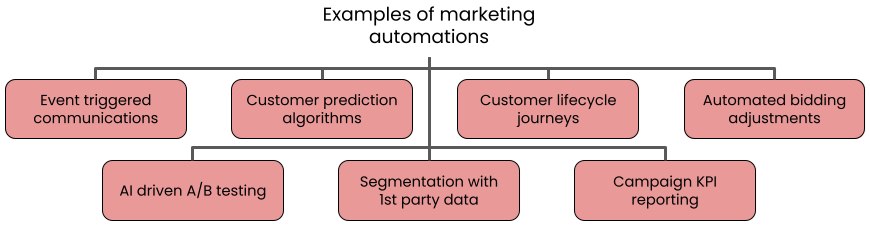
What’s more, many marketing activities are realistically impossible to run without some kind of automation.
For example, take an email campaign sent when a customer makes a purchase. Without the ability to import app/web events to the CRM tool and use them to trigger a predefined template, the CRM team would need to be on hand 24/7 – waiting for a customer purchase so they could fire off the email manually.
Modern marketers have a great deal of data to work with – both imports to tools (events, customer segments, personalisation attributes) and exports (campaign KPIs, customer engagement data) to company infrastructure e.g. the data warehouse. Automation is also essential here – as anyone who has spent hours messing around with CSV files can attest to.
Workflow marketing automation
Many marketing tools have internal automation functionality to help with the use cases above, but what happens when this is insufficient? When it’s necessary to automate a process between 2 tools for example, or when one tool is missing a specific capability.
Workflow marketing automation refers to automation functionality that is not offered by default by any one marketing tool, and so must be added by additional platforms (often with some coding/scripting).
What kinds of processes are we talking about here? Some examples:
- Send a promocode, stored in Google Sheet, by email when users complete their 3rd purchase event
- Forward a bad weather alert to inform customers to expect delivery delays
- Send an internal Slack notification when a bad review is received on Google My Business
- Collect customer survey data via a platform like Typeform and import to your CRM tool
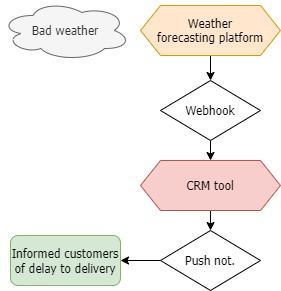
In these cases, you may need to use a 3rd party tool to help you automate the process. More on that in the follow up post!
How to identify opportunities for automation
It’s not always easy to identify which processes can be automated.
The most important functionality for marketing automation is an Application Programming Interface or API. This will allow you to programmatically import/export data, import events and trigger actions in the tool. It’s important to note however, that not all APIs are created equal. Often some functionality used in the tool is missing from the API and documentation can be wrong/outdated – so make sure to investigate the capabilities of your tool’s API before you start implementing anything.
Generally speaking, processes…
- Which involve the same repeated action e.g. entering the same piece of data on multiple customer profiles
- Where you regularly import/export the same data e.g. exporting campaign KPIs daily
- Which are triggered by events/actions e.g. emails sent after purchase
…are ideal for automating.
Think about the spreadsheets that you use. If there are any regular copy and paste jobs that you do, these can probably be automated. Anything that uses CSVs to import/export data can also normally be done programmatically via an API.
Thanks for reading! In the follow up post, I will take you through some ways of automating your marketing tasks.